
Shop floor automation software takes the paper travelers, spreadsheets and hallway conversations that run production and turns them into one live system: work orders, machine and operator status, material and batch records, quality data and a two-way link to your ERP. For a mid-market manufacturer with its own processes, the strongest version is software built around how your plant already runs, delivered in fixed-price milestones and owned by you. That is the kind of custom manufacturing software we build at Unstoppable Software.
This guide explains what these systems do, what they connect to, what to check before you commit, and when custom beats off-the-shelf.
Table of Contents
- What shop floor automation software actually is
- What can be automated on the floor
- How it connects to your ERP, MES and PLCs
- What to assess before you buy or build
- Information and improvements to expect
- Off the shelf, configured or custom
- Modernizing instead of replacing
- How we work with manufacturers
- A practical path to your first release
- FAQ
- Sources
What shop floor automation software actually is
“Automation” on the shop floor covers two different things, and search results mix them. One is physical: robots, cobots (collaborative robots that work beside people) and machine tending. The other is the software layer that tells the plant what to make, tracks what is happening and records the result. This article is about the second, because it is the part that decides whether the physical equipment is used well.
A shop floor automation glossary describes the flow like this. A production order specifies the product, quantity, materials, routing and due date. Planning software assigns the work to equipment. Sensors capture conditions while manufacturing systems update job status, quantities and inspection records. Dashboards and the ERP then see the same data.
In practice, that software layer usually includes some mix of these functions:
- Work orders and routings: releasing jobs to the floor, showing operators what to build and in what sequence, and recording completion.
- Scheduling: sequencing jobs across machines, cells and shifts, and re-sequencing when something breaks or a rush order lands.
- Batch and lot tracking: recording which raw materials went into which batch, in what quantities, for traceability and recalls.
- Quality data: capturing inspection results, measurements and nonconformances at the point of work rather than on paper.
- Equipment connectivity: pulling status and counts from PLCs and machines so nobody retypes them.
- ERP integration: passing orders, inventory and costs between the floor and the front office.
When the same functions are bundled into one product, the industry calls it a manufacturing execution system, or MES. You will see “shop floor control,” “shop floor tracking” and “shop floor automation system” used almost interchangeably for the same territory.
What can be automated on the floor
It helps to separate the software work from the hardware work, because they get planned together.
On the hardware side, NIST’s Manufacturing Extension Partnership lists the common robotics uses: machine tending for loading and unloading, autonomous mobile robots for material handling, automated visual inspection (measuring, inspecting seals and labels, reading bar codes) and cobots taking on dangerous tasks next to people. A CrossCo e-book on metals and machining adds that cobots commonly tend CNC machines and press brakes around the clock, weld and cut, palletize and package, assemble, and handle grinding and deburring.
Every one of those cells produces events: a part loaded, a cycle finished, a measurement out of tolerance. Software is what turns those events into a job record, a quality record and a signal to the next step. A robot that loads a CNC without a system recording what it ran, against which order, with which material lot, has automated motion but not information.
On the software side, the tasks worth automating first are usually the ones that currently live on paper or in someone’s head:
- Issuing and closing work orders.
- Logging labor, scrap and downtime.
- Recording batch genealogy (which lots went into which finished product).
- Capturing in-process and final inspection results.
- Sending completed quantities and material consumption back to the ERP.
How it connects to your ERP, MES and PLCs
Integration is where shop floor projects succeed or stall. An academic Cal Poly thesis on MES implementation found that an MES cannot work as a standalone unit, because it depends on several modules under the ERP umbrella. It names four that share data with it: supply chain management, customer relations management, production control and management, and production and process engineering.
Think of it as three layers:
| Layer | What lives there | What it needs from the layer below |
|---|---|---|
| Business (ERP) | Customer orders, inventory, purchasing, costing | Actual quantities, material use and labor from the floor |
| Execution (MES or custom shop floor software) | Work orders, scheduling, batch and quality records | Machine status and counts, operator input |
| Control (PLCs, sensors, machines) | Cycle logic, process values, alarms | Recipes, setpoints and job parameters from above |
The weak points are the seams. Orders that arrive from the ERP in a format the floor cannot use. Machine data that is available but never captured. A legacy application, often written years ago and understood by one person, that sits between two systems and that nobody wants to touch. A good design handles each seam explicitly, with clear ownership of which system is the source of truth for each piece of data.
What to assess before you buy or build
NIST’s MEP National Network guide, Automation 101 (March 2025), is a good checklist for a plant starting out. Its main points for software projects:
- Set clear goals and use a systems approach. Decide what you are fixing (late orders, scrap, lost traceability, double entry) before choosing a tool.
- Expect the process work to take time. The guide says structuring a system or process for the first time can take several months, while a machine can often pay for itself in about six months.
- Consider an MES as the first move. For some manufacturers, it says, leveraging an MES is the most productive immediate step, because it links the production floor to the front office.
- Think about people. Weigh the impact on process and staff, decide whether to integrate in-house or hire an integrator, plan operator training and arrange long-term support so you are not dependent on a vendor.
Turn those into questions you can answer on one page:
- Which three processes cost you the most time or money today, and how do you measure them?
- Which systems must the new software read from and write to (ERP, PLCs, quality databases, scales, label printers)?
- Which of your steps are standard, and which are the way you win business and cannot be bent to someone else’s workflow?
- Who will maintain it in year three?
- Who owns the code and the data model if you part ways with the builder?
The last two matter more than most buyers expect. Plants that rent a system they cannot change end up paying for each workaround, and plants that build without maintenance planning end up with exactly the aging application nobody wants to touch.
Information and improvements to expect
The practical benefit is visibility you can act on. Once work orders, quantities, material lots and inspection results are captured as the work happens, you can see which jobs are running late while there is still time to move them, which material went into which batch if a supplier issues a notice, and where scrap and rework cluster. The same data feeds analysis later: moving from spreadsheets to proper manufacturing data analytics is far easier when the numbers are captured cleanly at the source, and it is the foundation for predictive analytics on equipment and quality.
A concrete picture from our own work: clients have automated more than $200 million a year in orders and tracked 31 million pounds of raw material across 4,000 batches. Those are the scale of numbers that stop being manageable in spreadsheets and paper, and they are why traceability and order flow are usually the first things plants digitize.
Off the shelf, configured or custom
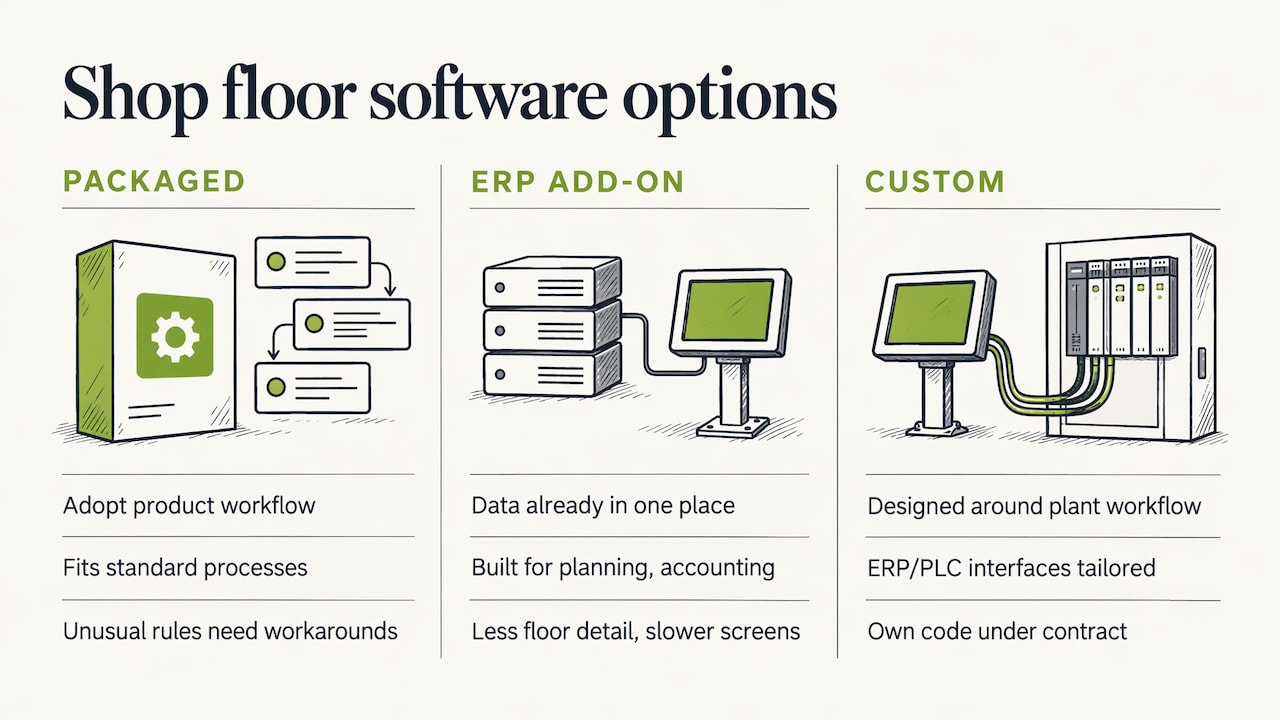
There are three broad ways to get shop floor software.
Packaged systems. You adopt the product’s workflow. This works when your process is close to the standard. It strains when your routings, batch rules, inspection plans or customer requirements are unusual, because the software forces operators to work around it, and the workarounds quietly rebuild the spreadsheets you were trying to retire.
ERP add-on modules. Convenient, since the data is already in one place, but ERP modules are built for planning and accounting, and the floor often needs more detail and faster screens than they offer. We cover this gap in filling the holes in your ERP system.
Custom software. The system is designed around the way your plant already works: your work order structure, your batch rules, your quality checks, your machines. Operators see screens that match their jobs, and the ERP and PLC integrations are built to your actual interfaces rather than a generic connector. Custom is the right call when your process is a competitive advantage, when you run a mix of equipment from different eras, when you need to keep and extend a legacy application instead of replacing it, or when you want to own the result outright. We lay out cases where custom-written software beats off the shelf in more detail.
Ownership is the part buyers underrate. With custom software delivered under a contract that hands you the code, your plant is not exposed to a vendor’s roadmap, licensing changes or end-of-life decisions, and any qualified team can maintain it. That speaks directly to the NIST advice about not becoming dependent on vendors.
Modernizing instead of replacing
Many mid-market plants already have a system that works, in its way: a database-driven application from the 2000s, an Access or Excel tool that became critical, a scheduling program built by a long-gone employee. Ripping it out is risky because it encodes years of rules that nobody wrote down.
The lower-risk path is incremental. Wrap the old application with a stable interface, move one function at a time (say, work order entry first, then batch tracking), keep the rest running, and retire pieces when the replacement has proven itself on the floor. Each step delivers something operators can use, and production never stops for a big-bang cutover. Our legacy system maintenance work in Microsoft technologies follows this pattern.
How we work with manufacturers
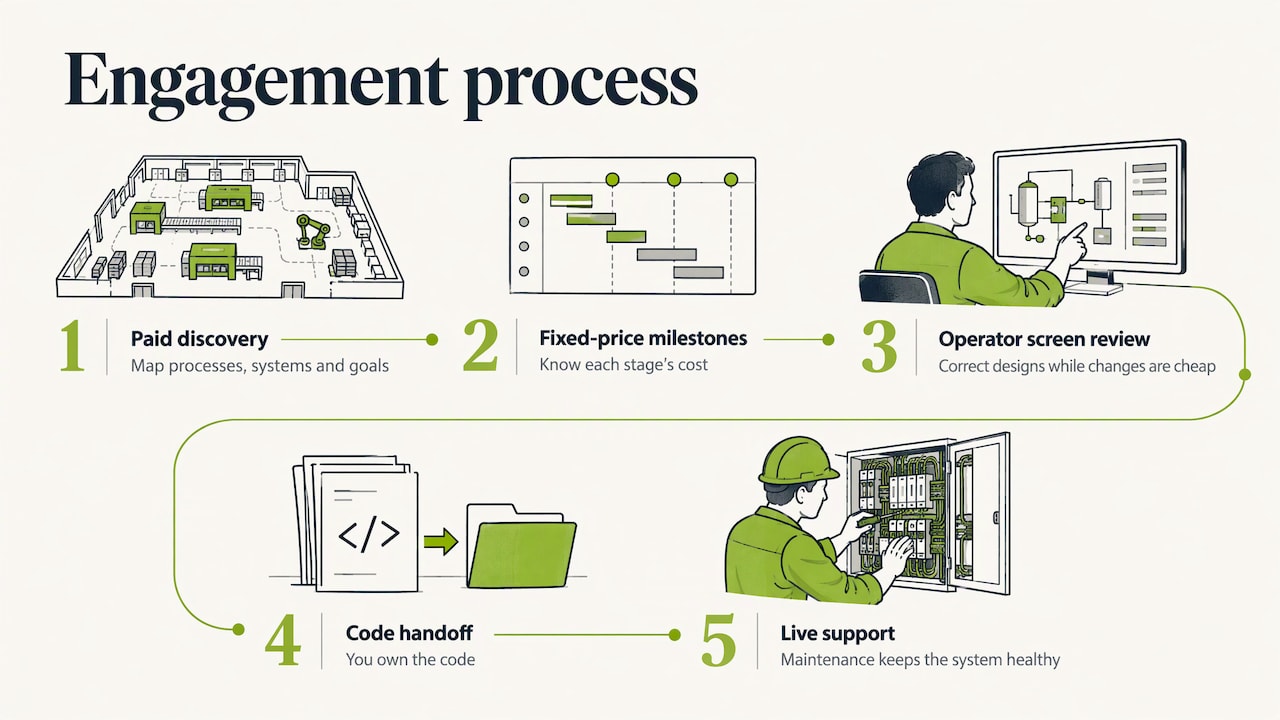
We have built manufacturing software for eighteen years: work orders, batch tracking, scheduling, quality data, and integrations with ERP systems and PLCs. Engagements start with a paid Design & Discovery phase, where we map your processes, systems and goals before anyone commits to a build. Development then runs in milestones at a fixed price, so you know what each stage costs, and it ends with you owning the code.
Our engineers use AI-guided development to put working software in front of operators in weeks, with automated tests on every feature. Seeing real screens early lets the people who use them correct the design while it is cheap to change. Our Custom MES Solutions cover the shop floor functions above, and Application Support & Maintenance keeps the system healthy once it is live.
If you have a plant running on paper, spreadsheets or a legacy application and want to see what a first milestone would look like, talk to us about a Discovery.
A practical path to your first release
Whatever you build, this sequence keeps the risk low:
- Pick one process with a measurable cost. Late work orders, lost traceability or manual quality logging are typical. Write down today’s baseline.
- Map the data. List every system and machine involved, who enters what and where each value originates. This is where hidden legacy dependencies show up, and it is what a Discovery phase is for.
- Define the first milestone small. A single work center or product line, with a real ERP and equipment link, is better than a broad prototype.
- Put it in operators’ hands early. Operators know where the process really deviates from the routing sheet. Their feedback in the first weeks is worth more than any specification.
- Plan training and support before go-live. NIST’s advice on operator training and long-term support applies as much to software as to robots.
- Expand cell by cell. Add the next line, function or integration only when the previous one is stable.
For the wider case on cost, see how practical custom software lifts profit margins. If your plant is changing hands or merging with another, the IT due diligence and integration checklist for manufacturing M&A covers the systems questions to settle first.
FAQ
What is a shop floor automation system?
It is the software, and the connections to machines and the ERP, that releases work to the floor, tracks job status, materials and quality as work happens, and reports results back to the business. Robots and other equipment may be part of the picture, but the software layer is what records and coordinates the work.
Is shop floor automation software the same as an MES?
They overlap heavily. An MES is the standard name for software that manages and records production execution. Shop floor automation software may be a full MES or a narrower set of functions, such as work orders, batch tracking or quality capture, built around one plant’s needs.
Do I need to replace my ERP to automate the shop floor?
No. The usual approach is to add a layer between the ERP and your machines that passes orders down and actual quantities, material use and labor back up. NIST’s guidance notes that an MES links the production floor to the front office, which is the role that layer plays.
How long does a project take?
NIST’s Automation 101 guide says structuring a process or system for the first time can take several months. We aim to put working software in front of operators in weeks, then expand in fixed-price milestones, so value arrives before the full scope is finished.
Who owns the software when it is custom?
That is set by the contract. In our engagements the client owns the code at the end of the project, which keeps you free to maintain or extend the system on your own terms.
Sources
- What is Shop Floor Automation? (Hyperbots glossary)
- Robotics and Manufacturing Automation, NIST MEP
- Collaborative robotics in the Metals & Machining industry, CrossCo (May 2024)
- Manufacturing Execution System (MES) implementation thesis, Cal Poly (2013)
- Automation 101: How to Plan for Successful Implementation, NIST MEP National Network (March 2025)