
MES stands for manufacturing execution system. It is the software layer that runs and records what happens on the shop floor: which work order is active, which materials went into it, what quality readings came back, and where each job stands right now. Your ERP plans the work. Your PLCs run the machines. The MES sits between them and keeps track of the execution. If your plant still relies on spreadsheets, paper travelers, or an aging application nobody wants to touch, you are doing some or all of this work by hand today, and that is the problem an MES is meant to solve.
Table of Contents
- What does MES stand for, and what does it mean in manufacturing?
- What does an MES do on the factory floor?
- Where does an MES sit next to your ERP, PLCs, and SCADA?
- What benefits can an MES give a mid-sized manufacturer?
- Do you need an MES? A quick self-check
- Off the shelf, custom, or modernize what you have?
- How to start an MES project without taking on too much
- How Unstoppable Software approaches MES
- FAQ
- Sources
What does MES stand for, and what does it mean in manufacturing?
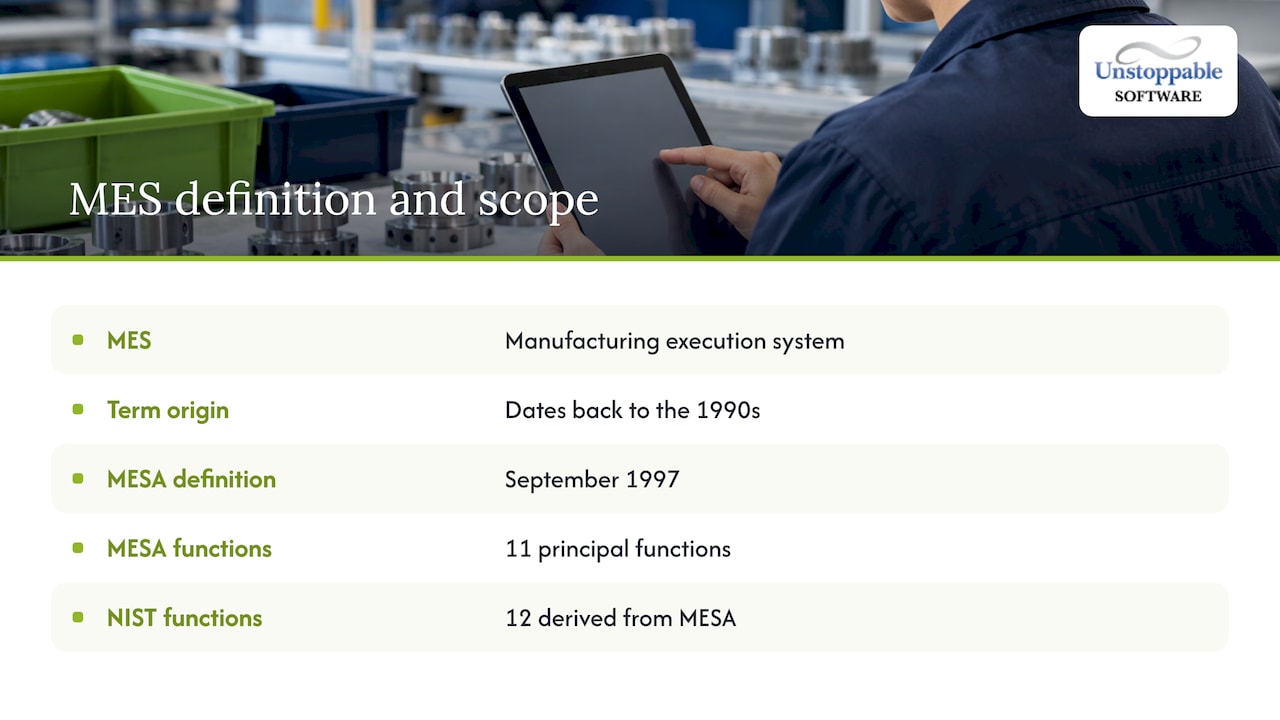
MES is short for manufacturing execution system. The term goes back to the 1990s. MESA International, the industry association that popularized it, published a definition in September 1997 and identified eleven principal MES functions. The National Institute of Standards and Technology (NIST) later worked from a list of 12 functions derived from MESA’s, which shows the scope has stayed fairly stable even as the technology changed.
Simply put, an MES answers the question “what is actually happening on the floor right now?” with data instead of walking around and asking. It covers the span from the moment a production order is released to the moment finished goods are complete, and it records what was done along the way.
In a business setting you may also hear “MES” used loosely for any shop-floor software. That is fine in conversation. When you are scoping a project, though, it helps to be specific about which functions you need, because the word covers a lot of ground.
What does an MES do on the factory floor?
The functions NIST lists include resource allocation and tracking, detailed scheduling, production unit dispatching, specification management, data collection, labor management, quality management, maintenance management, product tracking and genealogy, performance analysis, and material management. That is a long list, so here is how it looks in daily terms for a manager.
Work orders and dispatching
The MES takes a released order and turns it into instructions an operator can act on at a workstation: what to build, in what sequence, with which materials and which documents. NIST describes dispatching as directing the flow of jobs, orders, batches, lots, and work orders in real time as events happen on the floor. When a machine goes down or a rush order arrives, the queue changes without someone rewriting a whiteboard. If your work orders still live on paper, see our guide to electronic work orders and this example of work order management for manufacturing.
Data collection
An MES gathers data from machine sensors, PLCs, and the operators themselves. Counts, cycle times, downtime reasons, temperatures, and scrap all get captured as the work happens, not reconstructed at the end of a shift. The practical value is that decisions about overtime, rework, or a late shipment rest on current numbers. For what to capture and how to build it, read our piece on real-time production tracking.
Materials, genealogy, and traceability
Product tracking and genealogy, in NIST’s description, gives visibility into where work is, who is working on it, which component materials went in, and any alarms or rework. It builds a historical record. For process and batch manufacturers, this is the function that answers a customer or auditor asking which lots of raw material ended up in which finished batch. Doing that with spreadsheets means hours of cross-checking. With an MES, it is a lookup.
Quality management
Quality management in an MES means analyzing product and process measurements as they come in, including statistical process control (SPC, the practice of charting measurements to spot drift before parts go out of tolerance), and alerting when a result falls outside limits. The same logic applies in regulated process industries. If you want a view of how quality systems are structured in another sector, this overview of QMS software for chemical manufacturing shows the kinds of records and controls involved.
Maintenance and performance analysis
Machine run time and condition data can feed maintenance schedules, and performance analysis turns the collected data into measures such as downtime and throughput. NIST notes that some of this analysis resembles what an ERP reports, but the MES version is an important data source for scheduling and dispatching because it is captured in real time at fine detail.
Where does an MES sit next to your ERP, PLCs, and SCADA?
Most plants have three kinds of systems, and the MES is the middle one.
| Layer | Typical systems | Main job |
|---|---|---|
| Business planning | ERP such as SAP, Microsoft Dynamics 365 Business Central, Epicor, Infor | Orders, inventory, purchasing, costing, finance |
| Manufacturing execution | MES (off the shelf or custom) | Work orders, materials, quality, and production data on the floor |
| Control | PLCs, SCADA, sensors, machines | Run the equipment and report signals |
The ISA-95 standard, which defines how enterprise and control systems should talk to each other, puts ERP at Level 4, MES at Level 3, and PLC and SCADA control at Level 2. In practice, the ERP sends the MES production orders, bills of materials, and routings. The MES sends back actual quantities, material consumption, scrap, and quality results. Oracle’s PeopleSoft documentation describes the same split: the ERP remains the system of record for item masters, bills of materials, and routings while the MES gathers detailed operational information.
This is also the answer to a common question: is SAP an MES? SAP’s core ERP is a planning and business system, not an MES. Some ERP vendors, SAP included, sell separate MES or manufacturing operations products that connect to the ERP, but that is a different purchase from the ERP itself. The same is true of Business Central or any other ERP: it can hold your orders and inventory, yet it will not tell you what an operator at Line 3 did in the last ten minutes unless something captures that data. For a deeper comparison, read MES vs. ERP.
A useful side effect of this layering is that your ERP does not have to talk directly to your PLCs. The MES handles that conversation, translates machine signals into business terms, and keeps your ERP clean.
What benefits can an MES give a mid-sized manufacturer?
NIST’s Manufacturing Extension Partnership has noted that MES production data fed into an ERP, combined with the ERP’s inventory and order data, can help small and mid-sized manufacturers respond more quickly to changes in demand. That is the realistic framing. An MES gives you better information, faster. What you do with it determines the result, and no honest vendor can promise a specific percentage of savings before looking at your plant.
The benefits managers usually care about are these:
- Visibility. You see work in progress, bottlenecks, and downtime as they happen instead of the next morning.
- Fewer retyped numbers. Every time someone copies a figure from a paper traveler into a spreadsheet or ERP screen, an error can slip in. An MES captures it once.
- Traceability. Lot and batch records are built as production runs, which matters for customer audits and recalls.
- Consistent execution. Operators get the same instructions every time, which helps when turnover is high. See how that played out in consistency in a high-turnover manufacturing environment with custom MES.
Do you need an MES? A quick self-check
Be honest about fit. An MES is not the right first step for every shop. If you run a handful of machines, build simple products, and your biggest problem is that quotes and invoices are slow, fix that in your ERP or accounting system first. A simpler tool such as a shared spreadsheet with locked templates may serve you for a while.
An MES starts to pay attention when several of these are true:
- Work orders are printed or handwritten, and status is learned by asking someone.
- You cannot trace a finished lot back to raw material lots in under an hour.
- Supervisors spend part of every shift reconciling counts, scrap, or hours.
- Your ERP shows what was planned but not what happened.
- A homegrown application runs part of production, and only one person understands it.
- Your off-the-shelf system makes operators work in an order that does not match how the plant really runs.
If you recognize three or four, a scoped MES project is worth pricing. If it is one or two, start with that single problem.
Off the shelf, custom, or modernize what you have?
There are three routes, and each fits a different situation.
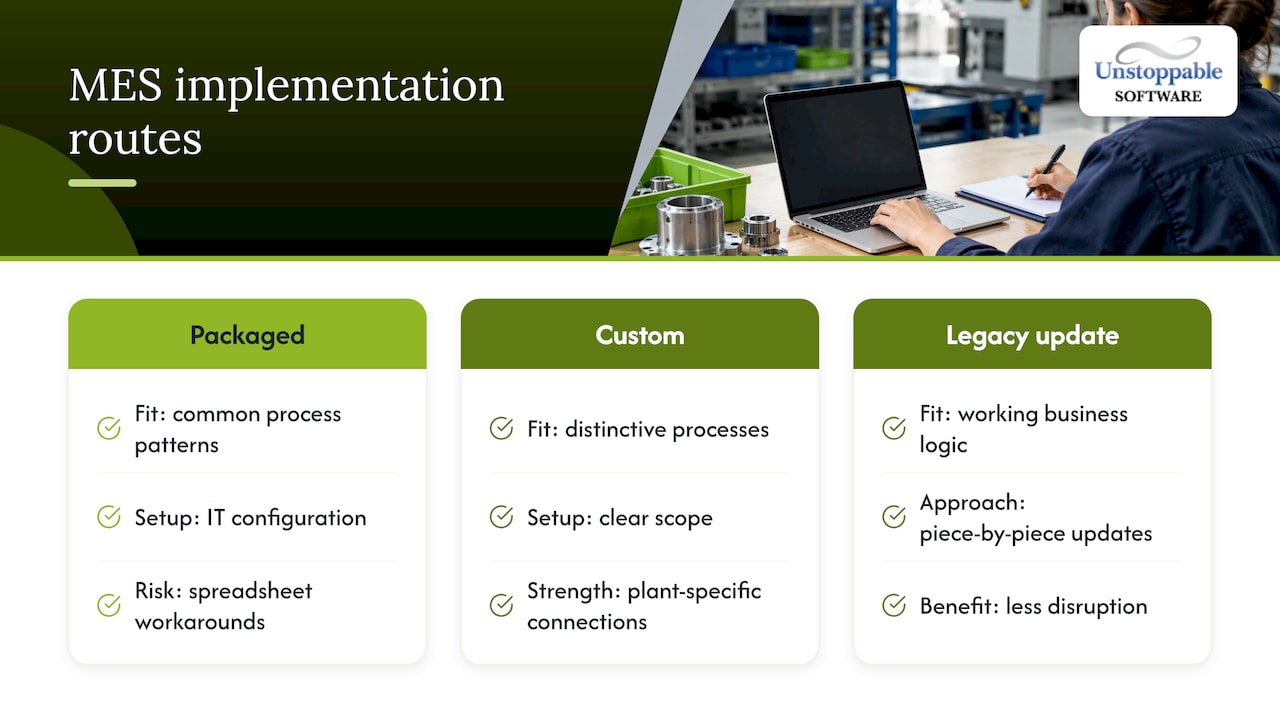
Packaged MES. Works well when your process is close to a common pattern, your team is willing to adapt to the product, and you have the IT staff to configure it. It tends to struggle when your routings, batch rules, or quality checks are unusual. Plants then add workarounds, such as side spreadsheets, which defeats much of the point.
Custom MES. Built around how your plant already runs and connected to your specific ERP, PLCs, and databases such as SQL Server. This route suits plants with distinctive processes, batch and recipe logic, or traceability requirements that packaged products handle awkwardly. It takes a clear scope, which is why starting with a defined discovery phase matters.
Modernizing a legacy application. If an older system already holds your business logic and works, replacing it can be riskier than improving it. Updating it piece by piece, adding integrations and better screens, often costs less disruption than a rip-and-replace. Our note on why you should keep your legacy system covers when that holds.
Many plants end up with a mix: keep the ERP, keep the parts of the legacy application that work, and add custom MES functions where the gaps cause daily pain.
How to start an MES project without taking on too much
A manager’s job here is scoping, not coding. These steps keep a project on track.
- Pick the one or two functions that hurt most. Electronic work orders, batch tracking, or quality data capture are common starting points. Trying to implement all eleven or twelve functions at once is how projects stall.
- Map the data flow on paper. List what the ERP sends the floor, what the floor must send back, and which PLCs or machines need to be read. Name the actual systems, for example Business Central for orders and a specific PLC brand for the line.
- Decide who owns data quality. An MES is only as good as the data going in. Barcode scans, operator prompts, and required fields prevent the free-text mess that spreadsheets accumulate.
- Ask for working software early. You want operators using something real within weeks so you learn from the floor, not from a slide deck.
- Insist on tests and code ownership. Automated tests protect you when you change a process later, and owning the code means you are never locked in.
- Plan support from day one. Production software needs someone who knows it when a line changes or an integration breaks.
How Unstoppable Software approaches MES
We have built manufacturing software for eighteen years: work orders, batch tracking, scheduling, quality data, and integrations with ERP systems and PLCs. Our Custom MES Solutions are built around how your plant already runs, not around a product’s assumptions, so operators are not asked to work around the software.
Engagements start with a paid Design & Discovery phase. Development then goes ahead in milestones at a fixed price, and you own the code at the end. Our engineers use AI-guided development with automated tests on every feature, which is how we put working software in front of operators in weeks. If you have an older application in the mix, we modernize it piece by piece through legacy software modernization, and the same team stays on for support and maintenance.
Running on paper or spreadsheets? Let's talk about what to build first.
If you are weighing an MES for a plant in Ohio or elsewhere in the Midwest, the first conversation is about your current process and which function to tackle first. You can start at our custom MES page.
FAQ
What does MES stand for?
MES stands for manufacturing execution system. It is software that monitors and controls production on the shop floor, tracking work orders, materials, quality, and machine data as work happens. The term was formalized by MESA International in 1997.
Is SAP an MES system?
SAP’s core ERP is a business planning system, not an MES. SAP and some other ERP vendors sell separate manufacturing execution or operations products that integrate with the ERP. Either way, the MES layer handles real-time floor activity, and the ERP handles planning, inventory, and finance.
What is the difference between MES and ERP?
ERP plans and manages the business: orders, purchasing, inventory, and costs. MES executes and records production on the floor in real time. The ERP sends production orders down, and the MES sends actual quantities, material use, scrap, and quality results back up.
Can a small or mid-sized manufacturer use an MES?
Yes. NIST has written specifically about why small and mid-sized manufacturers should consider one. The practical approach is to start with the single function that causes the most daily pain, such as work orders or batch traceability, and expand after that works.
Sources
- NIST Response to MES Request for Information
- NIST: Why Small Manufacturers Should Consider a Manufacturing Execution System
- Oracle PeopleSoft: Integration with Manufacturing Execution Systems